 Masked Email Manager
Your Fastmail Masked Emails, on your phone
Give every signup its own address, then switch off the one that starts attracting spam. Your real address stays yours.
Free for your first 10 addresses, US$2.99 for unlimited. iPhone and iPad, and the same build runs on Apple silicon Macs and Vision Pro.
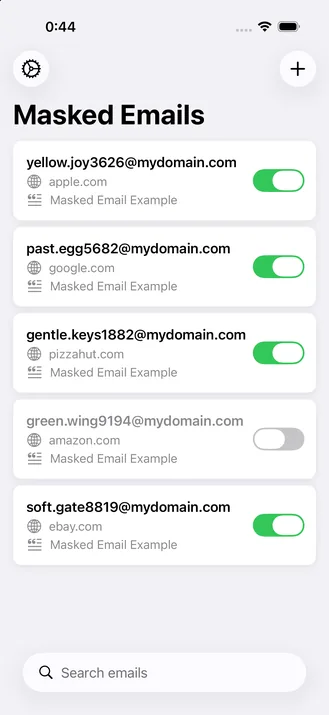

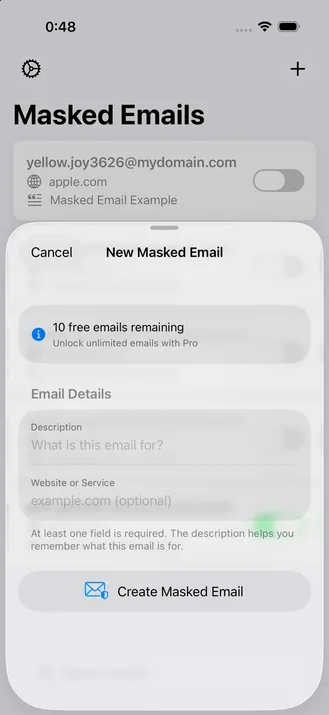
Two fields and you have an address
Say what the address is for, name the site, and Fastmail hands back the address, ready to copy.
Set a prefix in Settings and every address you create in the app starts with it. Leave it empty and you get Fastmail's own word pairs. Thestep-by-step guide covers creating an address here and in Fastmail's own settings.
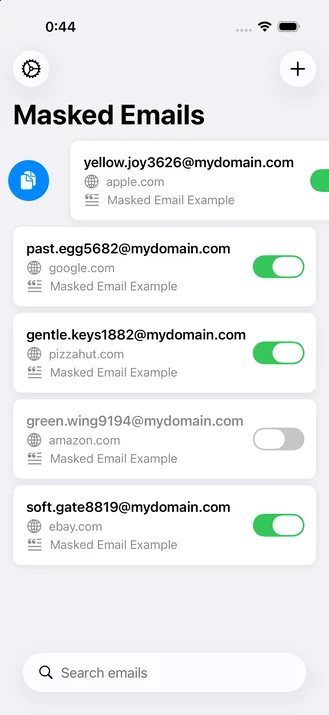
Copy with a swipe
Swipe a row and the address is on the clipboard. No selecting text on a phone screen, no switching to Fastmail and back.
You can copy the site an address belongs to instead, which is what you want when tracing a leak.
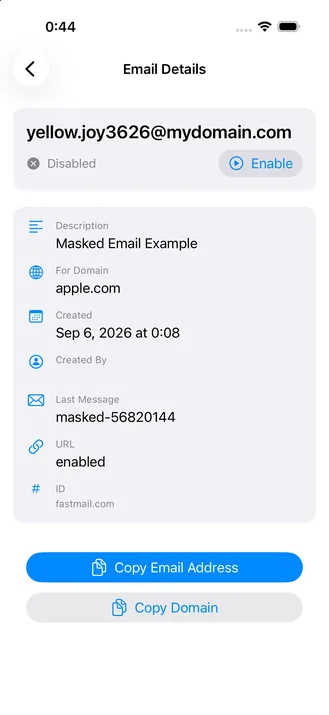
Block the one that started leaking
Blocking sends that address's mail to Trash instead of your inbox. Nothing bounces, and you can switch it back on if the service turns out to matter.
The app records what each address was for and when you made it, so a year later you can still tell which signup is behind the spam. Theblocking guide covers both places you can do it and how it differs from deleting.
Access
The app cannot read your mail
You paste in a Fastmail API token scoped to Masked Email. That scope lets the app list, create, block and delete Masked Emails, and nothing else. It cannot read a message, send one, or reach your contacts, and that limit is enforced by Fastmail rather than promised by this app.
There is no account to make here and no server of ours in between: requests go from your device to Fastmail. Delete the token in Fastmail and the app loses access immediately.
Two things do leave the device, and neither carries your addresses: crash reports from App Store builds, and the purchase check that tells the app whether the Full Version is active. The privacy policy names both and lists everything the app stores.
Pricing
Free to use, US$2.99 to lift the limit
The free version shows every Masked Email on your account and lets you block and unblock any of them, search, copy, and create up to 10.
One purchase removes the creation limit and adds the Shortcuts action and Siri on iPhone and iPad. It is a single in-app purchase tied to your Apple Account, not a subscription, and it carries across your devices.
Questions
Before you install
Is there a Sign in with Fastmail option?
No. You create an API token in Fastmail and paste it into Settings, which takes a minute and is the only setup step. The upside is that the token is scoped to Masked Email, so the app cannot reach your mail. The one exception is Fastmail's Basic business plan, which cannot create tokens at all.
Why not just use the Fastmail app?
You can. Masked Email sits in Fastmail's settings, and anything you change there shows up here. What this app adds is a list built for the addresses themselves: search, swipe to copy, and a Shortcuts action that makes one without opening an app at all.
What happens to mail sent to a blocked address?
Fastmail delivers it to your Trash folder rather than your inbox, so it stops reaching you without bouncing. Unblocking puts delivery back to normal.
Can I delete an address?
Not from the app. It blocks and unblocks, which is the reversible option. Deletion is a separate state you set in Fastmail's own settings.
Which domain do the addresses use?
Whichever one your Fastmail account is set to: fastmail.comunless you point it at a domain you own. The app lists them either way.Choosing the domain covers what each option costs you.
Do addresses I made in Fastmail show up?
Yes. The list comes from Fastmail, so anything you created in the web interface or the Fastmail apps appears here, and changes made here appear there.
Who makes this
One person, and a command line tool that came first
I'm David. In 2021 I wrotemaskedemail-cli, an open source command line client for Fastmail Masked Email, and I still maintain it. This app embeds that same library.
Support mail comes to me rather than a helpdesk. Feature requests too, including the small ones.
Get Masked Email Manager
Free to install, and your existing addresses appear as soon as you connect.