 Masked Email Manager
Fastmail alias vs. Masked Email
Your Fastmail account can hand out an address that is not your main one in several ways, and two of them look almost identical from the outside. The difference shows up later, in how you turn one off and what the sender learns when you do.
Which is which
An alias is an address you invent and type in yourself, like
shop@you.example. It suits a handful of addresses you mean to keep and want to
remember.
A Masked Email address is one Fastmail generates for you, like
gentle.keys1882@fastmail.com. It suits a fresh address for every signup,
because you never have to think one up and you can switch any of them off on its
own. Replies go out from it by default, and you can start a message from
one too.
Side by side
| Alias | Plus addressing | Masked Email | |
|---|---|---|---|
| Who picks the name | You do | You do | Fastmail generates it |
| Setup before you can use one | Create it in settings | None | Generate it in settings or an app |
| Hides your real address | Yes | No, the base is in the string | Yes |
| How many you get | 600, plus 15 per user | No limit | Fastmail publishes no number |
| An off switch that does not bounce | No, only a rule | No, only a rule | Yes, block it |
| Reversible | Disabled yes, deleted only if the name is free | Not applicable | Yes, blocked or deleted |
What the sender finds out
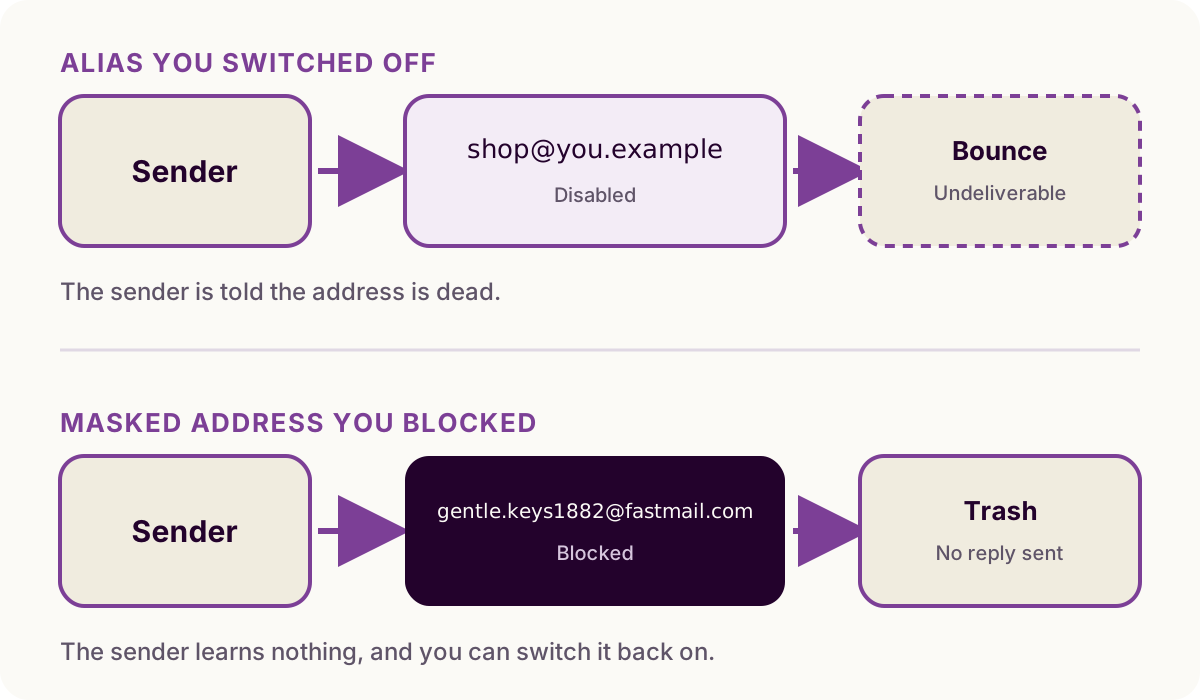
Disabling an alias notifies the sender with an undeliverable bounce, and so does deleting one: Fastmail states that any further email sent to that address will bounce. Either way, whoever wrote to you is told the address is dead, including the senders you made the address to get away from.
Deleting is different if the alias sits at a domain of your own with a catch-all on it. Nothing bounces then, because the address simply stops being one you defined and the catch-all takes it, so the mail keeps arriving. Fastmail's way to stop a single address there is the opposite of deleting: keep the alias and turn on reject all mail sent to this address, which bounces that one and leaves the rest of the domain working.
You can also silence an alias without bouncing, by leaving it switched on and sending its mail to Trash with a rule on the To/Cc/Bcc condition, or by pointing the alias's own delivery options at the same place. Nothing bounces, because Fastmail accepted the message before the rule ran. What you do not get is an off switch: the address still works, still takes whatever arrives, and still counts against your 600.
A masked address has that switch. Blocking it takes the mail to Trash, the sender sees a normal delivery, and switching it back on resumes delivery. Deleting a masked address does bounce, so blocking is the quiet option.
A deleted alias frees the name up, and Fastmail says another user could potentially create the alias in the future if it is at a Fastmail domain. You can make the same alias again yourself, on your own domain or on a Fastmail one nobody has taken in the meantime, but that is recreating it rather than undoing the deletion. A deleted masked address is kept under Review deleted masked addresses in your settings and restores as itself.
How many you get
An account holds 600 aliases, plus 15 for every user in the account. That is a lot if you are picking them by hand, and not many if you make one per signup.
Masked Email has a ceiling too, and a separate limit on how fast you can create new ones, but Fastmail publishes neither number and says only that both exist to prevent abuse. In practice the one-per-signup habit is the one Masked Email is built for and aliases are not.
Where each one lives
Aliases are under Settings, then My email addresses. Choose Add address, then Create an alias, then pick the part before the @ and a domain from the dropdown. Once it exists you can give it a name and a signature for sending, and point its mail at a folder. Fastmail warns that an alias can take up to 15 minutes to start working, so a signup form that rejects it immediately is worth retrying rather than debugging.
Masked Email is under Settings, then Privacy & Security, then Masked Email. There is nothing to name. You press the button, an address appears, and you paste it.
Masked Email also has an API, which is what third-party apps including this one use to list addresses and block one without opening settings. Masked Email Manager does not touch aliases: the token it holds is scoped to Masked Email addresses.
Plus addressing, and the subdomain form
you+shop@example.com costs nothing and needs no setup. It arrives in your inbox
with the suffix intact, so you can file it with a
rule and see which service handed your address
on.
However, plus addressing does not hide the address underneath. Whatever you
built it on, your main address or an alias, is sitting in the string, and anyone
who wants that address can delete the +shop. There is also nothing to switch off
afterwards, because you never registered anything: once a sender has
you+shop@example.com they can reach you until you write a rule to stop them.
Some signup forms reject the + outright as well.
Subdomain addressing, shop@you.example.com, gets past the forms that reject a
plus sign and behaves the same way otherwise: the address underneath is still
recoverable from it. That address is always an alias here, because subdomain
addressing needs one with no dot or underscore in it. Use either form for sorting
your mail, not for hiding from a sender you might want to cut off.
Which to use
Use an alias for permanent addresses you share publicly or say out loud, such
as billing contacts, personal correspondence, or business roles like
invoices@your.company. These should be memorable, and since you rarely retire
one, the bounce on the way out costs you little.
Use Masked Email for web signups, forums, trials, and retail checkouts where a service might leak your address. You can shut an address down silently at any time without affecting other services.
Nothing stops you running both. They answer different questions.
Both can sit on a domain you own, by different routes: an alias offers any domain on the account in its dropdown, while Masked Email takes the domain from an account-wide setting that only an admin can change, and fixes it at the moment you create the address. Which domain your addresses use covers that setting, and the explainer covers catch-alls and the comparisons with Apple's Hide My Email and the forwarding services.
Masked Email Manager keeps the generated addresses on your phone, so blocking the one that started attracting spam takes a tap rather than a trip to Fastmail's settings.