 Masked Email Manager
Masked Email vs. SimpleLogin, DuckDuckGo and Firefox Relay
All four hand a signup form an address that is not your real one. Three of them forward the mail on to a mailbox somewhere else. Fastmail is that mailbox.
The forwarding hop
SimpleLogin, DuckDuckGo Email Protection and Firefox Relay are forwarders. The address belongs to them. You tell them which mailbox to relay it to, and that mailbox can be anywhere: Gmail, Outlook, Proton, or Fastmail itself. Mail therefore passes through two providers before you read it.
A Fastmail Masked Email address is an address on your own account, like every other address on it. There is nothing to relay to, because Fastmail is already the destination.
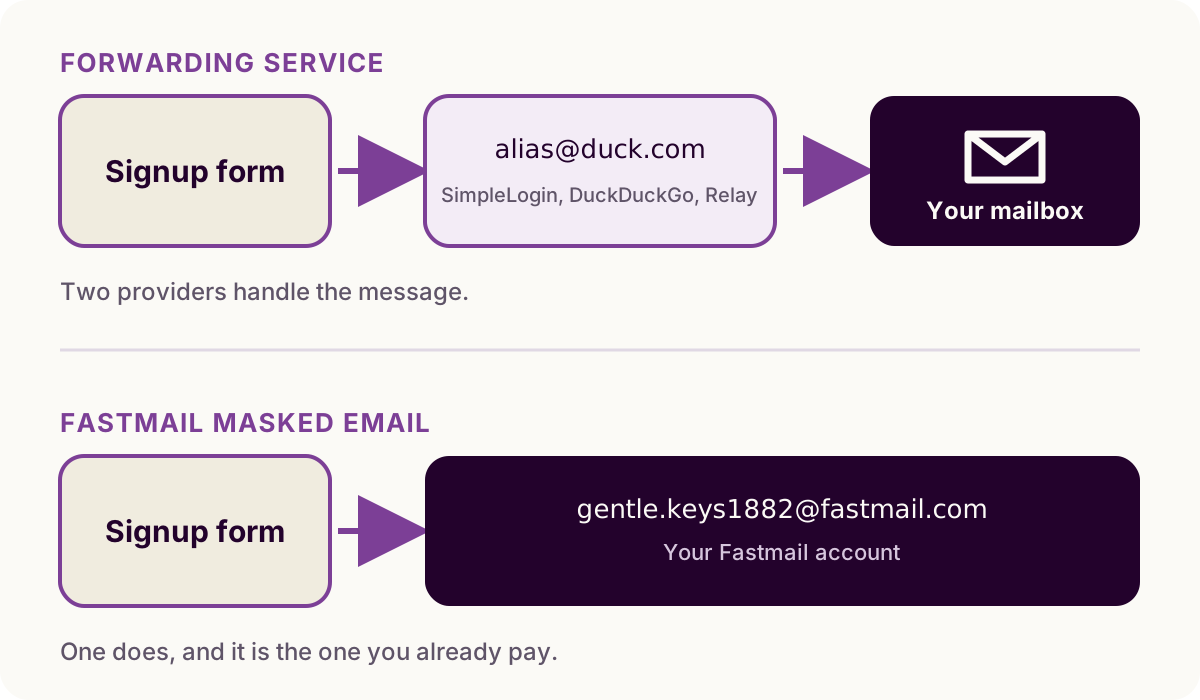
The hop is what lets a forwarder work with the inbox you already read. It costs you a second account to keep alive, and a second company handling every message on its way through.
SimpleLogin
Owned by Proton, and open source. The free tier covers 10 aliases and one mailbox, replies included. Premium is $36 a year, or $4 monthly, for unlimited aliases, your own domains, catch-all and subdomain addresses, several mailboxes, and PGP.
It is the closest of the three to Masked Email in what you can do with an address once you have made it, and the only one whose whole product is the alias layer.
DuckDuckGo Email Protection
Free, with no paid tier, and described by DuckDuckGo as a service that
“removes multiple types of hidden email trackers and lets you create
unlimited unique private email addresses on the fly.” Addresses end in
@duck.com and forward to the inbox you already use.
The trade is that you generate addresses through DuckDuckGo's own app, browser or extension, so the tool you use to make one is decided for you.
Firefox Relay
Mozilla's, and the smallest free tier of the three: everyone gets five email masks. Premium adds unlimited masks, a custom domain, replies, and blocking promotional mail. It is the one to reach for if Firefox is where you sign up for things.
Where Fastmail Masked Email sits
It is included with every current Fastmail plan, personal and business, at no
extra cost, so there is no free tier and no upgrade: you either pay for Fastmail
or you do not. Addresses come from fastmail.com or
a domain you own, and blocking one
sends its mail to Trash instead of bouncing it. Fastmail also publishes an API,
which is why third-party apps for it exist.
The catch is that it needs a Fastmail account, which starts at $5 a month billed yearly. That is not a price worth paying for an alias feature alone. If you are already on Fastmail, though, you have this and may not know it.
Which one to use
- Not on Fastmail, and not moving. DuckDuckGo Email Protection is free and unlimited, and it works with the inbox you have.
- You want the alias layer itself to be good. SimpleLogin, for the domains, the multiple mailboxes and the PGP.
- You already pay for Fastmail. Masked Email is sitting in your settings. A forwarder in front of it adds a company to do a job your account already does.
Running two is fine: each service only ever sees the address you typed into that particular form.
New to the Fastmail side of this? What Masked Email is covers how the addresses behave, and the Hide My Email comparison covers Apple's version of the same idea.
If Fastmail is where your mail already lands, Masked Email Manager puts its addresses on your phone.