 Masked Email Manager
Sorting the mail your masked addresses bring in
A masked address per signup is easy to make and easy to forget. They all deliver to the same inbox, and the address a message was sent to is the one thing that tells one signup from another.
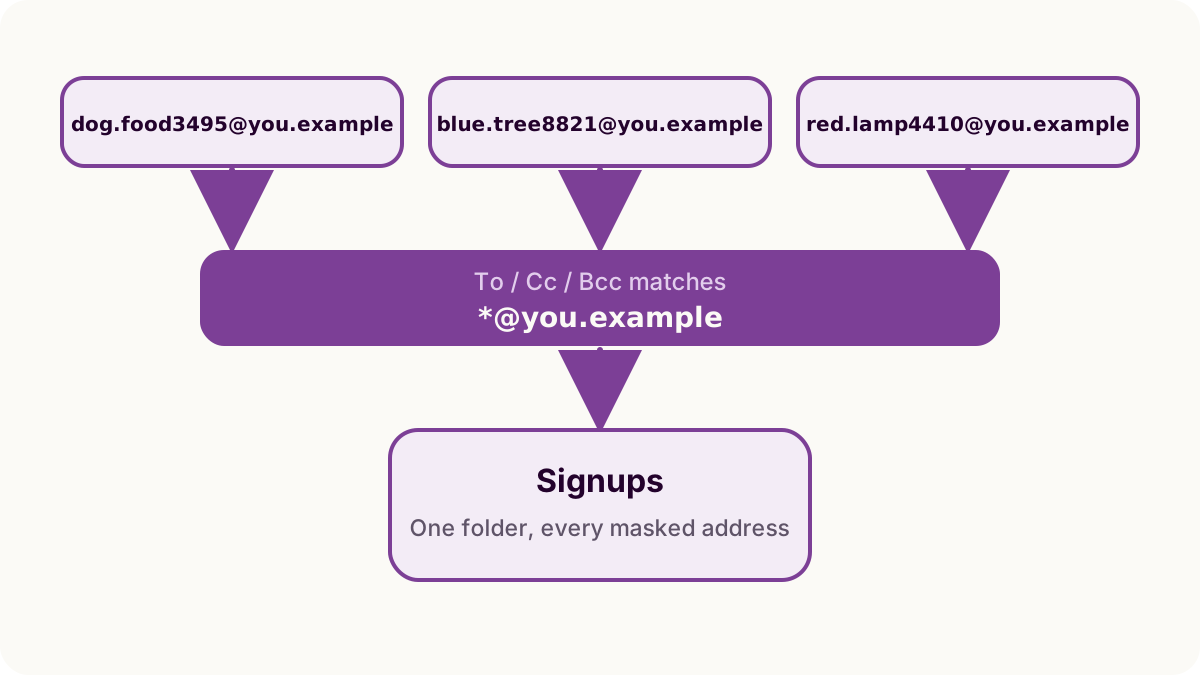
Rules are a web interface job
Rules live in Settings, under Filters & Rules.
Fastmail's documentation says they
can only be created in our web interface, but they will still function if you
use a mail client
. So it is a one-off job at a computer, and afterwards every
device sees mail that is already sorted.
A rule is conditions and actions. The condition to use here is To/Cc/Bcc, holding the masked address. The action is usually Move to a folder, though the list also covers marking read, pinning, snoozing, notifying, sending a copy elsewhere, and going straight to Trash or spam.
Rules are applied in the order they are listed, and you reorder them by dragging, so a broad rule sitting above a narrow one gets to the message first.
Start from a message instead of typing the address
Masked addresses are random words and a number, which is the sort of string you will mistype. Open a message that already arrived at the address, use the Actions menu, and choose Add rule from message…. Fastmail fills in conditions from that message, sender and recipient included, and you delete the ones you do not want before saving.
One glob instead of one rule per address
A rule per address means a new rule at every signup. If yours are at
a domain you own rather than the
shared fastmail.com, one condition can cover all of them.
Matches are anchored at both ends. A condition of you.example asks
whether the field is that text, and no masked address ever is. What you want is
*@you.example, where * stands for any number of
characters. ? matches a single character, and if a glob is not
enough, Create rule offers a
Switch to no-preview rules link that trades the preview for
full regular expressions.
The catch is that a glob matches a domain, not a masked address, so it is only
safe where everything at the domain is one. On fastmail.com nothing
is: your addresses and every other customer's share it. On a domain of your own
it depends what else you do with the domain, because if you take ordinary mail
there too, *@you.example catches that as well and a
Move to action files your real correspondence in with the
signups.
Where that applies, match the addresses that matter one at a time. Switching the domain setting is not a way out of it either: the domain is fixed when an address is created, so a change decides where the next address lands and leaves every existing one where it is.
Finding everything one address ever received
Fastmail marks a message that came in through a masked address with a mask icon beside the sender's name, so you can pick one out of a list you have not sorted at all.
For the whole history of a single address, go to Settings, then Privacy & Security, then Masked Email, find the address (the list searches on both the address and its description), and use Search Mail. That shows what one shop has sent you since you signed up.
That search skips Trash and spam unless you add in:*, which matters
for an address you blocked, because blocking is what put its mail in Trash.
Descriptions are what you search on later
A year later the address itself means nothing and you only remember the shop. The description you wrote when you created it is the text you search on then.
Masked Email Manager writes that description at creation time and shows it on the address, next to when it was created and when it last received a message. Changing a description afterwards is a Fastmail settings job, so write the name of the site rather than "shopping" the first time.
When mail goes missing covers the other direction: mail a rule has filed somewhere you did not look, and how to tell that apart from mail that never arrived.
Rules decide where the mail lands. Masked Email Manager is for the address itself: search the list for the site, see when it last heard from them, and switch it off.